

ParetoLogic FileCure 1.1
It allows you to assign appropriate programs to each file extension
Program info
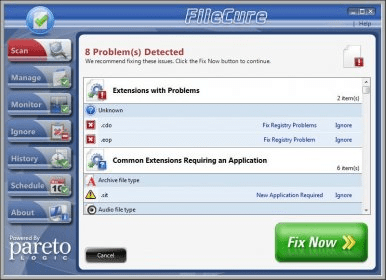
There are oodles of files with different file extensions and we might not know about it, but each file extension should be assigned to its right program. When we open a file from Windows Explorer or My PC, the system automatically detects its file extension and opens the appropriate application for that file - unless the file extension hasn't been assigned yet. Thus, we don't have to worry about what application is needed to open a file. Nevertheless, some file extensions may not be properly associated with their applications and may not opened correctly, e.g. file extensions missing the required application after installing or uninstalling software.
FileCure allows you to scan, manage and monitor appropriate programs for each file extension. It scans the Windows registry and checks if there is any file extension needed the appropriate application to open it. As a matter of fact, it's really easy to use: you just have to scan your computer and FileCure will automatically show valid extensions, extensions with problems, and extensions requiring a specific application, so you can fix all the related problems. You can also schedule scans, check out the file extension repair’s history and check for associations performed by FileCure or third party applications.
Pros
- Easy to use
Cons
- Trial version only detects problems. To fix problems you need to register your FileCure copy
Details
Extensions

No information available
The data will be available later.Old versions

No information available
The data will be available later.Awards

Related software

It helps you find relevant information about unknown file formats

A tiny piece of software that changes file extension.

It checks your system application for all invalid and outdated DLL errors.
Related stories
See all
We have wrapped up a list of the most popular and reliable VPN services for Google Chrome, the most popular Internet browser in the world.
The built-in File Explorer in Windows has gone a long way since 3.11 (that's a very early version of the OS, oh young one). Let's see what it can do in Windows 11.
Opera's Browser Operator aims to automate chores like shopping and booking, going beyond current AI assistants by completing tasks right in the browser.


Comments