

ParetoLogic FileCure 1.0
FileCure scans your Windows registry to find out which formats your existing software supports.
Program info
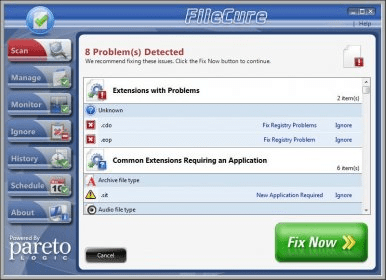
FileCure scans your Windows registry to find out which formats your existing software supports. If you do not have the correct software on your computer, FileCure will suggest and locate programs that you can download to open certain file types.
Have you ever had a situation where you double clicked on files with .pdf, .jpg, .mp3 or another popular extension and, even though you have the right software installed, it does not open? Sometimes file extensions get accidentally mixed up. You would never try to use Word to open a music file, but problems like this often occur. FileCure can help by putting the power in your hands to manage file extension associations.
Key features:
- Directs you to the appropriate software to open common file types
- Easy-to-use drag and drop analysis of file extensions
- Scans registry to let you know which extensions are currently supported
- File manager feature makes it easy to control the associations between extensions and applications
- Monitors your system and alerts you if something is trying to alter your file extension associations
- History page makes it easy for you to keep track of what has been done
- Support from a strong Customer Care and Support Team
- Free database and product updates
FileCure is a smart and friendly tool that allows you to find and download different programs so that you can open any kind of files.
Details
Extensions

No information available
The data will be available later.Old versions

No information available
The data will be available later.Awards

Related software

It helps you find relevant information about unknown file formats

A tiny piece of software that changes file extension.

It checks your system application for all invalid and outdated DLL errors.
Related stories
See all
We have wrapped up a list of the most popular and reliable VPN services for Google Chrome, the most popular Internet browser in the world.
The built-in File Explorer in Windows has gone a long way since 3.11 (that's a very early version of the OS, oh young one). Let's see what it can do in Windows 11.

Opera's Browser Operator aims to automate chores like shopping and booking, going beyond current AI assistants by completing tasks right in the browser.


Comments